In this project, you will write a C program, using SWARC/MMX acceleration, to filter a Portable PixMap (PPM) file for higher-quality display on an LCD panel... which happens to spatially separate red, green, and blue "thirds" of each display pixel. In other words, your program transforms image files into images that represent each original pixel as a third (single color channel) of each output pixel.
Why is this subpixel rendering a good thing? Basically, it can nearly triple the effective horizontal resolution of an LCD display without any changes to the hardware. This is particularly critical for display of text in small fonts, because English text happens to have much more detail per unit area in the horizontal direction than in the vertical. A good introduction is at:
http://dynamo.ecn.purdue.edu/~hankd/SUBPIX/
Another, more detailed, overview is at:
In case you were wondering, MicroSoft announced at COMDEX in November 1998 that they were developing ClearType to provide a "300% improvement" in text rendering on LCD panels, and a bunch of us immediately realized the LCD panel properties that they must be taking advantage of and how we could do likewise. I independently developed and implemented the technique presented in this assignment.
So, how would your program be used? Well, it is not trivial to make this technique the default text-rendering for X windows (XFree86) or for even the Linux console, but most of us actually are most seriously resolution-impaired when viewing Postscript documents on our laptops using gv or some other wrapper for gs (the GhostScript Postscript converter). To improve the quality of this display, all we need to do is to build a better "wrapper" for gs.
Let's begin with the problem of creating a triple-resolution image for a page. It so happens that gs can be told to render pages at three times the horizontal resolution, generating a ppmraw image file as output for each page. This can be done by invoking gs with the following (rather long) list of arguments:
gs -sDEVICE=ppmraw \
   -rxdpixydpi \
   -sOutputFile=outfile \
   -dNOPAUSE -dSAFER -dNOPLATFONTS -q infile </dev/null
The xdpi and ydpi values should be decimal integers such that xdpi is 3 times ydpi. They specify the logical "dots per inch" resolution of the converted image. If the source is 8.5"x11" letter-size Postscript, ydpi should be about 43 to fit a 640x480 screen, 54 for an 800x600, and 69 for a 1,024x768; in other words, -r129x43 is about right to fit a full page on a 640x480 display, yielding a final subpixel-rendered image that is roughly 366x473.
The infile would simply be the Postscript source, probably in a file whose name ends with .ps or .pdf. However, the outfile argument is a bit tricky in that you will want to have the name parameterized with a number field so that each page goes into a different file. This is done much like using printf to print an integer, e.g., tmp%02d.ppm would yield files for each page image named tmp01.ppm, tmp02.ppm, tmp03.ppm, etc. There is an additional complication in that these PPM files may actually be in a monochrome variant of PPM because the latest versions of gs do this to minimize the file space taken. If the first line of any of these files starts with P4, it needs to be converted to a 24-bit color raw PPM by:
convert p4file colorppmfile
Where convert is a utility from the ImageMagik graphic image tool package.
Ok, so we can convert each page into a separate color raw PPM image, and the program you are writing will convert each PPM file into an appropriately subpixel-rendered version. How the heck do you display the results? Well, there are many choices, xv, gimp, etc., but probably the most convenient is ImageMagik's display utility, because it has a wide variety of command-line controls. Take your pick. Better still, pick and then code that into a script that behaves like gv or ghostview.
However, for this project, all you need to do is to write a tight little program that will re-render a color raw PPM file using subpixel techniques.
Your program will both read and write what are known as color "Raw" PPM files. This is a very simple format, developed for use with the pbmtools image processing tools, and supported by virtually all unix graphics programs. A file in this format contains:
The separator described above generally consists of whitespace (non-printing) characters such as space, tab, carriage return, or newline. However, comments also can be placed in this whitespace; any text between the # character and the next newline is also treated as part of the separator.
To make your life a bt easier, I have written and given you full source code for ppmio.c -- a little sample program that simply reads a 24-bit color raw PPM file and then spits-out a similar file (with a different comment in it). You can get the program source code from the course WWW site. You are free to use any portion of this code in writing your program.
The LCD subpixel rendering technique improves effective display quality by making use of the fact that the three color channels within each display pixel are spatially distinct and consistently ordered. Thus, your basic transformation is to take an original image that has 3 times the desired horizontal resolution, and to render that at the output resolution by separately controlling the 3 color channels within each pixel.
What makes all this interesting is that there are tradeoffs involved. For example, simply taking the appropriate channel value from the original pixel that has the same position as this output subpixel does maximize effective resolution, but greatly diminishes color quality: color fringes are seen on many object edges within the image. On the other hand, if we constrain every output compound pixel to have exactly the correct color, all we have done is effectively antialiasing of the 3x oversampled image, with no improvement in resolution. Of course, it also is somewhat inconvenient that 3's keep coming up in this math, since 3 is not an easy number to divide by.
With all of this in mind, there are several different filter designs that make sense:
To clarify the above, a little diagram might help. Filter (1) is essentially transforming an input image sequence x into an output sequence y as:
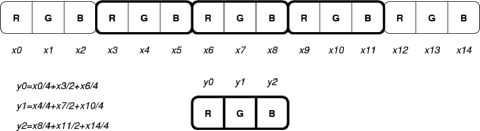
As you can see, this is a fairly simple process, except perhaps for the edges of a scanline. At the edges, you do not have a complete set of values to weight, so you must adjust the formulae accordingly. Of course, you can also see from the diagram that the filter design is sensitive to the spatial ordering of the red, green, and blue subpixels on the display.
To support all three filters for both common color orders, your program should offer the following command-line options:
The complete command line thus is:
thirdy options inputfile outputfile
Where options are as listed above, and zero or more may be given. Outputfile is the output file and inputfile is the input file.
Normally, I would have specified that these filenames would be optional (reading from stdin and writing to stdout in their absence), but requiring file names makes it possible to use memory-mapped file I/O rather than the usual sequence of read(), write(), lseek() calls. Actually, ppmio.c only uses memory mapping for the input, and that's probably how your code will work best as well. The reason is that the disk blocks for a file just created are naturally still buffered in system memory; thus, using memory mapping allows these blocks to be directly accessed without any physical I/O, and without making a copy, by simply adding them to the user process page table entries. There is less of an advantage in use of memory mapping for writing a file, because allocating new blocks will invoke significant overhead for each new block, whereas one big write() suffers the overhead only once (although using write() does imply copy overhead). There are also alignment constraints for either rading or writing; memory-mapped data starts at a physical block address boundary, which may make fields within that file misaligned in memory, and thus require multiple bus cycles for each access. It's complex to determine what I/O method is fastest, but at least you have full flexibility in selecting.
Because the code for your project will use MMX (and possibly 3DNow!) instructions, you will only be able to run it on a machine whose processor supports those instructions. However, you may use any systems you want to develop your code, and it is particularly nice if you have access to an MMX-capable system with a color LCD display.
You can compare your program's operation to that of the sequential "reference" solution. Even if you cannot see the marvelous benefits without an LCD display, you can still compare your project to this purely sequential (and not well optimized) solution. To facilitate this comparison, I've provided a little program called triple.c, which converts a PPM file into a PPM file with the colors separated-out for each pixel so that you can see the effect even on a CRT display or printer.
Your code can use any C constructs accepted by IA32 GCC, and can use SWARC, GCC built-in functions, and/or raw MMX/3DNow! inline assembly macros. You can get all of that stuff from http://aggregate.org/SWAR/
You should not use any library routines beyond the standard I/O facilities and Linux/unix system calls. Input image files will be between 1MByte and 10MBytes, typically around 3MBytes; you may assume that both the entire input file and the entire output file simultaneously fit in main memory. (Both images total less than 14MBytes, and most of UK's Linux PCs have enough main memory to deal with that.)
What you will hand-in for this project is a brief "implementor's
notes" file (thirdy.html) and source and make files to
construct and run an executable named thirdy.