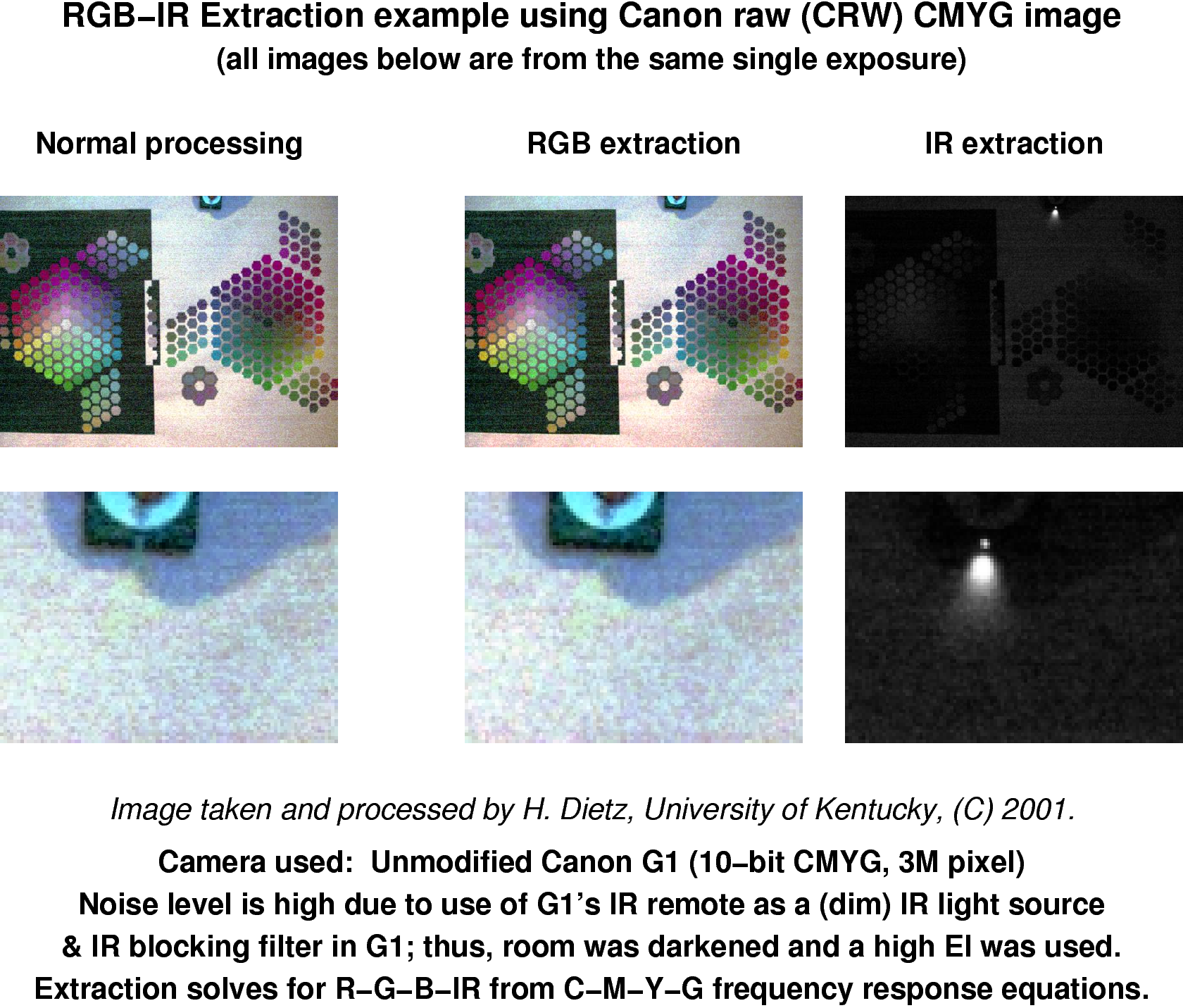
In this project, you will write a C program, using SWARC/MMX acceleration, to convert a raw sensor image from a Canon G1 digital camera into a Portable PixMap (PPM) file for RGB (Red, Green, and Blue) or Ir (Infrared).
The sensor uses a CMYG (Cyan, Magenta, Yellow, and Green) pixel filter pattern and you would expect that each sensor pixel only sees light of the same color as the filter in front of it. However, filters are imperfect... which is good because human color perception is not really based on wavelength. For example, light that mixes yellow and blue wavelengths is seen by us as green even though there isn't really any green-wvaelength light present. Thus, what a sensor pixel sees is really a weighted average of all the wavelengths as they are attenuated by the filter. This leads to a lot of errors involving identification of the precise wavelengths present (a problem known as metamerism), but it also leads to statistically valid ways to identify the energy present in any wavelength band -- even bands that are not directly related to the apparent color of the filters.
Using RGB filters, it doesn't take a rocket scientist to derive approximate RGB color values; you can just pretend RGB is RGB. Similarly, the standard way to reconstruct RGB from CMYG is very straightforwardly using color combination rules. For example, Y=R+G and we have both Y and G filtered pixels, so R=Y-G. However, that's assuming perfectly sharp filter wavelength cutoffs.
We can do somewhat better by solving a system of linear equations expressing how sharply-cutoff R, G, and B light is weighted by each of the filters. For example, the G-filtered pixels might have a sensitivity profile of 0.11*R + 0.86*G + 0.08*B. By solving three equations in three unknowns, filter-RGB in terms of reference-RGB, we easily get correction factors that can be used to adjust the colorspace. In fact, this also is how RGB is converted into colorspaces like YUV. This approach also is used in dcraw, an excellent program written by Dave Coffin to decode a wide variety of raw sensor image formats used in consumer digital cameras. The problem is that some cameras, like the Canon G1, use CMYG filters, yielding 4 equations in 3 unknowns....
Dave Coffin's rather clever solution is to solve four separate sets of 3-by-3 equations and then to average the results. The 3-by-3 equations are created by literally leaving-out one of the CMYG channels; thus, he averages CMY->RGB, MYG->RGB, CYG->RGB, and CMG->RGB. The result is quite good, but any solution of a 4-by-3 system of equations is inherently flawed. So here's our solution: add a fourth color channel to make a 4-by-4 system of equations. That fourth channel is Ir. Coffin's RGB from GMCY weightings are:
{ -2.400719,  3.539540, -2.515721,  3.421035 } /* R from GMCY */
{  4.013642, -1.710916,  0.690795,  0.417247 } /* G from GMCY */
{ -2.345669,  3.385090,  3.521597, -2.249256 } /* B from GMCY */
I computed RGBIr from GMCY weightings using the Canon G1's Ir remote as the Ir reference source. That is not a very good way to calibrate, but it does work. The values are:
{ -1.382995,  0.249841, -0.159960,  1.289882 } /* R from GMCY */
{ -0.265864, -1.457404,  0.933098,  0.809020 } /* G from GMCY */
{ -1.423661,  0.167074,  1.381977, -0.097471 } /* B from GMCY */
{ 15.097626, 12.247668, -9.044717, -8.382289 } /* Ir from GMCY */
The most disturbing thing about this is that the Green filter ends up having a negative correlation with the Green output color channel... the Green filter tracks Ir better than Green! On the other hand, Green is derived primarily by seeing both Cyan and Yellow, which isn't all that counterintuitive.
There is a fair amount of processing needed to convert a losslessly compressed Canon G1 raw image file (.CRW) into an RGB image. The first step involves reading the header and undoing the compression. The Canon G1 uses a 10-bit analog to digital converter to sample a 2088 by 1550 pixel sensor for which the 0th and all even-numbered rows have the filter pattern GMGMGM...; odd numbered rows have the filter pattern YCYCYC.... The next step is to interpolate values all the filter colors for each pixel location, giving 16-bit integer values for each channel at each pixel location. Given that data, it is then possible to apply the colorspace transformation to generate RGBIr. The problem with RGBIr is that most conventional image file formats have 3 color channels; thus, it becomes most convenient to output the results as either an RGB file or an Ir file (i.e., three identical channels of Ir,Ir,Ir). This is further complicated by the fact that most image formats handle only 8 bits per color channel, so the wider dynamic range must be adjusted to the 8-bit range.
The good news for you is that Dave Coffin's dcraw program does all of this... well, except for the Ir. Thus, you are to do just two things:
The SWAR implementation may use the SWARC compiler, GCC built-in functions, or GCC inline assembly code. It is entirely your choice. The easiest is often to code using SWARC and then hand-tune the resulting code for better performance. However, for this project, you will notbe graded on performance.
What you will hand-in for this project is a brief "implementor's notes" file (dcrawi.html) and source and make files to construct and run an executable named dcrawi. These will be submitted via a WWW form as a tar file.
The test image is 5689.crw, which should look
like the image above, except in that the color balance is likely to be
off. The error in the color balance is not an error in the color
extraction process, but is due to the inability of dcraw to read and
use the G1's white balance information. Thus, the reddish RGB image
you'll get would need to be white balanced using a tool like xv,
gimp, or display in order to match the sample given above. It is also
worth noting that the latest version of dcraw uses a better method
of interpolation, so your image will appear significantly less
grainy than those shown above.